
Key takeaways: Getting full fibre installed
|
|---|
If you've been putting off switching to full fibre broadband because you're worried about the installation, you're not alone. It’s fair enough to be concerned about drilling, digging, and disruption.
But the reality is that most full fibre installations are quick and painless.
Don’t let it put you off getting a faster and more reliable connection than you had before.
Can you get full fibre?
Use our postcode checker to see which full fibre providers are available at your address.
What is full fibre broadband?
Full fibre broadband is also sometimes called FTTP (Fibre to the Premises). It works by running a fibre optic cable directly from the network infrastructure to your home.
This is different from part fibre (FTTC), where a copper wire still carries the signal from the street cabinet to your front door.
Broadband speeds are much faster with full fibre. That matters if you work from home, video call regularly, or live in a busy home.
Full fibre is also the technology that future speed upgrades run on.
Why go full fibre?
Once you get fibre cable installed in your property, you won’t need an engineer visit again.
It's:
- Faster
- More reliable broadband
- Future-proof
But there’s a practical consideration, too.
The UK is in the middle of one of the largest telecoms infrastructure changes in history.
The Public Switched Telephone Network (PSTN) will be switched off in 2027. This is a copper-based network that has carried phone calls and broadband connections for decades.
This change will affect both voice calls and part-fibre broadband services.
Providers will migrate most customers to a line-free equivalent, but the process won't be seamless for everyone.

- Speed: 150Mb avg. speed
- Set-up cost: £0
- Contract: 24 months
Rewards:
£23 per month
£26.50 from 1st April 2027
£30 from 1st April 2028

- Speed: 264Mb avg. speed
- Set-up cost: £0
- Contract: 24 months
£18.99 per month
£22.99 from 1st April 2027
£26.99 from 1st April 2028

- Speed: 150Mb avg. speed
- Set-up cost: £0
- Contract: 24 months
Rewards:
£23 per month
Price may rise during contract
How to order full fibre and book your installation
Not all providers and networks are available in every area.
An address check helps you easily find which providers and speeds you can get. Try it now!
You don't need to contact an engineer yourself or arrange anything with Openreach or CityFibre directly. The provider handles that on your behalf.
You should get a choice of dates to pick from, so you can make sure the installation day is convenient for you.
You'll receive confirmation from your provider once the appointment is booked, and usually a reminder closer to the date.
In some cases, a survey visit might be arranged before the installation itself. This is only necessary if you have unusual access requirements. This could be a long driveway, or if you live in a block of flats.
Need help choosing speeds? Visit our guide to broadband speeds for clear tips on how to choose the best package for your home.
A note for renters
If you rent your home, you'll need your landlord's permission before any drilling or cabling work is carried out. It's worth getting this sorted before your installation date.
Most landlords are happy to give approval since full fibre installation doesn't damage a property.
If you’re finding it difficult to get approval, explain that the PSTN switch-off means they’ll soon have no choice!
What to do before the engineer arrives
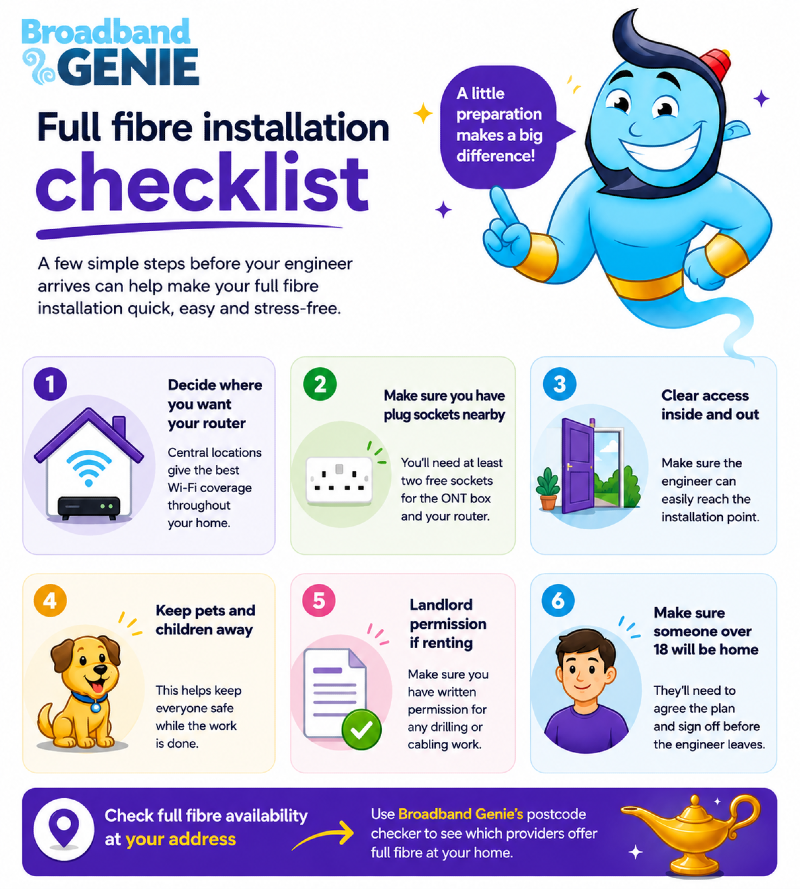
- Think about where you want the fibre cable to enter your home
Where would you like the connection box and router placed? The entry point is usually on an exterior wall close to where you want the router. Central locations tend to give better Wi-Fi coverage.
Get more tips in our guide: ‘Where’s the best place to put a Wi-Fi router?’
- Make sure there are at least two free plug sockets near your chosen router location.
The ONT (the box that connects the fibre cable to your router) and the router itself both need power.
If your setup includes a cordless phone base unit or a digital voice adapter, you might need an extra socket. You could also need an extension lead.
- Clear the area around the installation point.
The engineer needs to work freely near the entry wall and the socket without moving furniture.
- Make sure the outside of your property is accessible.
Unlock any gates and keep outside areas clear, so they can work freely.
- Keep any pets and children away from the working areas for the duration of the appointment.
- Have your landlord's written permission to hand if you rent.
- Let your provider know if you rely on any device that runs off a phone line.
This could be a burglar alarm, telecare pendant, or fax machine.
- Make sure someone over 18 will be home. The engineer needs to confirm the cable route and entry point before any work starts. They’ll also need your sign-off before they leave.
What happens on installation day
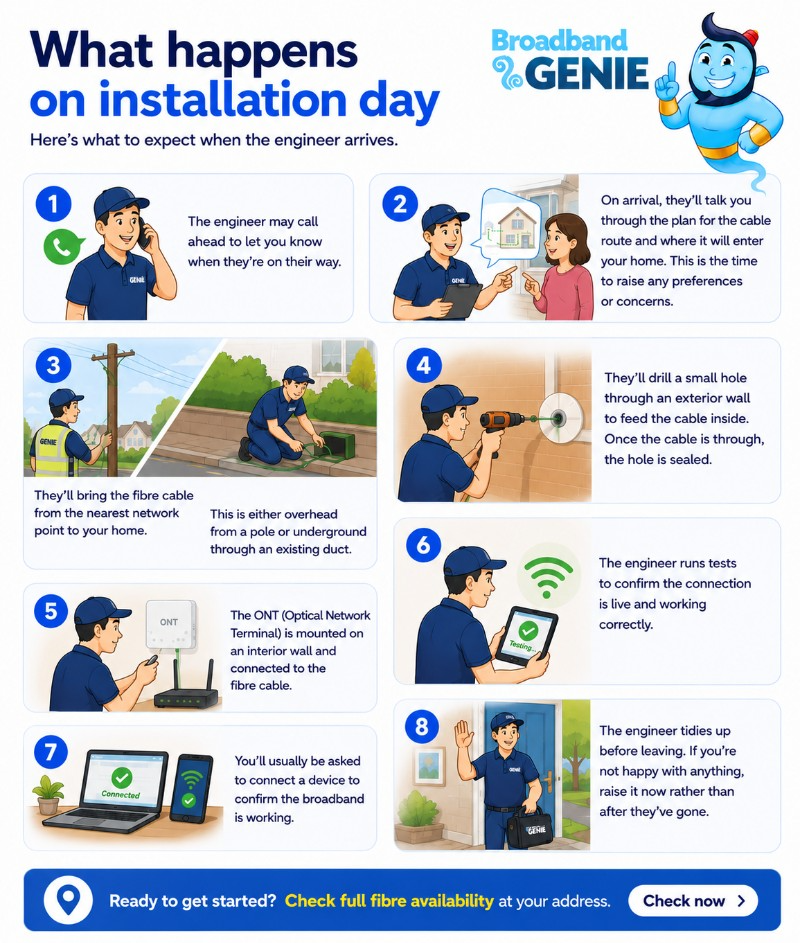
Here's what to expect once the engineer arrives.
- The engineer may call ahead to let you know when they're on their way.
- On arrival, they'll walk you through how they plan to route the fibre cable and where they're proposing to bring it into the property. This is the moment to raise any preferences or concerns.
- The engineer will bring the fibre cable from the nearest network point to your home. This is either overhead from a telegraph pole or underground through an existing duct in the pavement.
- They will drill a small hole through an exterior wall to feed the cable inside. Once the cable is through, the hole is sealed.
- The ONT (Optical Network Terminal) is then mounted on an interior wall and connected to the fibre cable. This is the box your router plugs into, replacing the phone socket your old router used.
- The engineer runs a series of tests to confirm the connection is live. They’ll make sure it is working correctly before they consider the job done.
- You’ll usually be asked to connect a phone or laptop to confirm the broadband is working. If anything isn't right, make sure it’s resolved before they leave.
- The engineer tidies up before leaving. If you notice anything you're not happy with, raise it now rather than after they've gone.

- Speed: 500Mb avg. speed
- Set-up cost: £0
- Contract: 24 months
Rewards:
£29.99 per month
£33.99 from 31st March 2027
£37.99 from 31st March 2028
- Speed: 500Mb avg. speed
- Set-up cost: £0
- Contract: 24 months
Rewards:
£27 per month
£30.50 from 1st April 2027
£34 from 1st April 2028
How to discuss your full fibre installation with an engineer
When the engineer arrives, they will show you the proposed fibre cable route. They’ll also talk about where the internal equipment will go.
Think about this in advance. The ONT needs to be near a double power socket.
Its position will determine how easy it is to get a good Wi-Fi signal around your home. Somewhere central and not hidden in a cupboard or utility room is generally best.
This is the best time to:
- Ask the engineer about different entry points for the cable
- Request that the cable is routed in a way that keeps it less visible
- Ask questions about anything you're unsure of before any work starts.
A good engineer will talk you through the options and explain what's involved before starting work.
You can cancel if you're not happy
It's worth knowing that you're not obliged to go ahead with the installation on the day.
If you’re not comfortable with the proposed installation plan, or if something feels wrong, decline and reschedule.
There's usually no penalty for doing this, but check the small print just in case.
How to get full fibre installed in your home
The method used to install fibre in your property depends on the local network and your home’s layout.
Here's what typically happens.
Feeding the cable to your property
If the connection comes from underground, the cable usually runs through an existing underground duct. No excavation is required.
If the connection comes from a pole, the cable runs along the wire to your property. It then enters at a high point on an outside wall.
Getting the cable inside
Once the cable reaches the outside of your home, a small hole is drilled through the wall to bring it inside.
The engineer will agree with you on where this hole should go before any drilling takes place.
If the cable comes from a pole, you may need extra, small holes. These holes help secure the cable safely to the outside wall. This is standard practice.
Installing the ONT
Once the fibre cable is inside, the engineer installs the ONT on your wall. This is a small box where your broadband router connects.
The engineer will test the connection before leaving so you know everything is working.
What to do if you're unhappy with a full fibre installation
The vast majority of full fibre installations go as planned. When something does go wrong, knowing who to contact and what to document makes the resolution process much quicker.
Here’s what to check after the installation take places.
- Before the engineer leaves, check the work carefully
- Look at the entry point to confirm it's been sealed properly
- Are cables tidy? Are you happy with the ONT box position and how the router connects?
- If you notice an issue, raise it with the engineer at the time, rather than after they've packed up and left
- If you notice a problem after the appointment, take photos as soon as possible. They’re invaluable if you need to make a complaint or a damage claim
- That’s especially true for things like poorly sealed drill holes, scuffed plaster or a cable run that wasn't done as agreed.
-
Reporting a problem with an Openreach full fibre broadband installation
Openreach carries out installations on behalf of most major UK broadband providers. These include BT, Sky, EE, Plusnet, Vodafone and TalkTalk.
If your installation was done by an Openreach engineer, your first contact should usually be your broadband provider. They will raise the issue with Openreach on your behalf.
However, for complaints about:
- Property damage
- Quality of workmanship
- Engineer conduct
You can contact Openreach directly via the chat tool on their website.
-
Reporting a problem about CityFibre installation
CityFibre operates its own network in a growing number of UK towns and cities. It’s used by providers including Vodafone, Zen Internet and several regional ISPs.
For full fibre installation problems, contact your broadband provider first. Your provider will escalate to CityFibre if needed.
As with Openreach full fibre installation, documenting the issue with photos early on makes everything easier.
-
Reporting a problem with an altnet installation
Altnets are smaller, independent network operators that have been building full fibre infrastructure across the UK. Examples include Hyperoptic, Community Fibre, GoFibre and Trooli.
With altnets, the network and the retail service are often provided by the same company. This makes complaints easier - there's only one organisation to deal with.
Contact the provider directly, explain the full fibre installation problems clearly. Make sure to include your photos and any relevant dates and details.
- Read more: 'What are altnets?'
-
What to do if a full fibre complaint isn't resolved?
If your broadband provider doesn’t resolve your complaint within 8 weeks, you can escalate it to an ADR scheme.
You can also do this sooner if they send you a deadlock letter.
Most UK providers are members of either the Communications Ombudsman or CISAS. You can check which scheme your provider uses on their website or on Ofcom's website.
From April 2026, the waiting period before you can escalate will drop from eight weeks to six. This follows a regulatory change by Ofcom.
Full fibre installation FAQs
-
Will my garden need to be dug up to get full fibre?
Unlikely. Garden excavation usually happens only when there is a large gap between the nearest duct and your property.
It also happens when no overhead option is available.
If significant groundwork is needed, the installer should flag this before the appointment.
-
Will I need a hole drilled through my home to get full fibre?
Yes, a small hole is almost always required to bring the fibre cable through an external wall. This is typically around 10mm wide, which is roughly the diameter of a thick pen. This is sealed after installation.
The engineer will agree with you on where this entry point goes before drilling. This way, you can help keep it as unobtrusive as possible.
-
How long does a full fibre installation take?
Most residential installations take between 2 - 4 hours. Straightforward installs where the external infrastructure is already close to the property can be quicker. Properties that need external work or a longer cable run might take a bit longer.
-
Do I need to be at home when they install full fibre broadband?
Yes. A decision-maker aged 18 or over must be at home. The engineer needs access to both the inside and outside of the property. They'll want to walk you through the proposed cable route and get your agreement before work starts.
-
Are there alternatives to full fibre for fast broadband?
If full fibre isn't yet available at your address, there are a few alternatives worth considering. Cable broadband from Virgin Media uses a hybrid network. It can deliver gigabit-capable speeds in areas where it is available.
If you live in a rural area with limited or no fixed-line options, 5G home broadband may offer good speeds.
A fixed wireless access (FWA) service may also deliver good speeds without cabling.
Satellite broadband is another option for harder-to-reach rural properties.
None of these beats full fibre for reliability and long-term speed potential.
But they’re worth looking into if FTTP is not available at your address yet.
-
What is the ONT, and where will it be installed?
The ONT (Optical Network Terminal) is a small box on an inside wall. It sits where the fibre cable enters your home. It converts the optical signal from the fibre cable into a connection your broadband router can use.
-
What happens to my existing broadband during the installation?
Your existing broadband service will be active until your new full fibre service goes live. The timing of the switchover is usually coordinated, so there's minimal gap between the two.
If you use a phone line for voice calls, your provider should arrange the move to digital voice (VoIP).
This should happen at the same time as your broadband switch, or soon after.
Full fibre, the upgrade that's worth making
Getting a new full fibre connection is usually far simpler than most people expect. In most homes, it only takes a few hours and requires minimal disruption.
The speed and reliability benefits are significant. With the PSTN switch-off deadline in January 2027 getting closer, waiting longer means you have less control. You’ll also have less choice when it comes to upgrading at your convenience.
If full fibre is available at your address, now is a good time to compare providers and get your switch booked.
- Speed: 900Mb avg. speed
- Set-up cost: £0
- Contract: 24 months
Rewards:
£31.99 per month
£35.99 from 31st March 2027
£39.99 from 31st March 2028

- Speed: 1.6Gb avg. speed
- Set-up cost: £0
- Contract: 24 months
Rewards:
£33.99 per month
£37.99 from 31st March 2027
£41.99 from 31st March 2028
- Speed: 900Mb avg. speed
- Set-up cost: £0
- Contract: 24 months
Rewards:
£25.99 per month
£29.99 from 31st March 2027
£33.99 from 31st March 2028
Use Broadband Genie's postcode checker to see which providers offer full fibre at your home and compare the latest deals: