



All about Community Fibre broadband
Community Fibre delivers incredible ultrafast full-fibre broadband in London, with speeds that few other providers can match. In our 2025 Broadband Awards, it won the title of 'Best Broadband Provider in London'.
As well as very fast fibre broadband, it can also offer affordable deals with more modest speeds, which are still faster than many of the alternatives. You can also sign up for phone packages and optional TV bundles with Community Fibre.
Can I get Community Fibre broadband?
Unfortunately, if you don’t live in London, you won't be able to sign up for Community Fibre at this time. But all's not lost. There are other providers that can offer similar speeds, so enter your address or postcode into our deals checker and find out what else is on offer. Alternatively, you can visit our broadband deals in London page.
What packages are available? How fast is Community Fibre?
Community Fibre offers the following broadband packages, with plenty of choice of contract lengths - choose between 24-month, 18-month or 12-month deals.
- Community Essential Fibre: 35Mb download / upload speed (12-month contract only)
- Community Fibre 75: 75Mb download / upload speed
- Community Fibre 100: 100Mb download / upload speed
- Community Fibre 150: 150Mb download / upload speed
- Community Fibre 300: 350Mb download / upload speed
- Community Fibre 500: 500Mb download / upload speed
- Community Fibre 1 Gig: 920Mb download / upload speed (expected Wi-Fi speed 450-700Mb)
- Community Fibre 5 Gig: 5000Mb download / upload speed (expected Wi-Fi speed 600-950Mb)
Community Fibre is a 'Fibre-To-The-Premises' (full fibre) provider, which means it runs fibre lines all the way into your home, for a much quicker connection.
Many fibre broadband services only use fibre optic lines up to the street cabinet, with the final connection completed with the old copper telephone line (this is called FTTC or 'Fibre-To-The-Cabinet').
Community Fibre does away with this older tech and provides superior speeds and reliability as a result.
Community Fibre also offers the same download and upload speed, which is known as symmetrical broadband. This is a rare feature, so it has a far better upload speed than the majority of other deals you’ll find. You can also find this if you sign up to Hyperoptic, which also provides broadband in London.
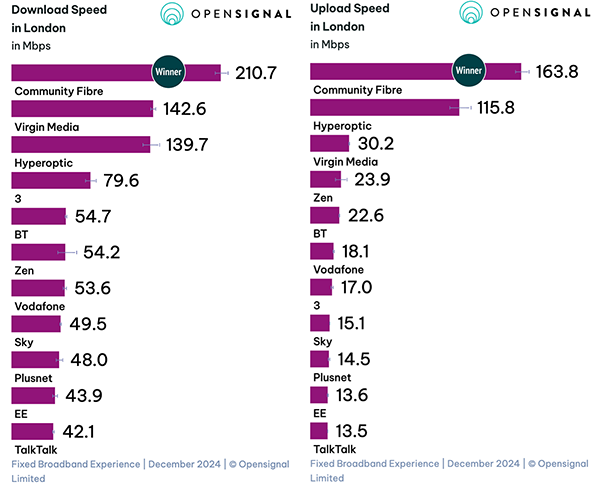
In its 'Fixed Broadband Experience' report, published by Opensignal in December 2024, Community Fibre came out on top for 'consistent quality', 'download speed', 'upload speed' and 'reliability experience' in London.
Community Fibre Wi-Fi router
All Community Fibre packages include a free Linksys Wi-Fi 6 Intelligent Mesh router.
Because the Linksys Velop is a mesh network router, if you find that your Wi-Fi network is struggling to reach around your home, then you can add another Velop router to extend coverage. A mesh kit provides a far quicker and more reliable connection than standard Wi-Fi boosters.
Read more: 'Why is my internet so slow? How to improve broadband speed.'
Community Fibre calls packages
All Community Fibre packages are broadband only deals, without any need for you to get a phone line or pay line rental.
But if you do want a home phone, this is available for an extra £10 per month (24-month contract). This will offer you:
- Unlimited calls to UK landlines and mobiles
- A free mobile app with features such as 1471, 1571, Voicemail, Call Forwarding and Call Barring
- Free Wi-Fi calls to all UK landlines and mobiles (even when travelling abroad)
- Free charge for keeping your existing phone number
No additional line is needed for this service. It uses your fibre optic broadband connection, with a free adapter for landline telephone handsets.
It's important to note that this does not provide you with access to either international or premium-rate numbers. You must also have an alternative phone (such as a mobile) in case of an emergency because if you lose power or broadband connectivity your Community Fibre phone will not work.
Community Fibre TV
An optional TV bundle is available as an add-on for all Community Fibre deals.
For an extra £10 per month (24-month contract), you get a free 4K TV box with access to 240+ live channels (including Freeview) and a library of on-demand content. Other features include:
- Choice of add-ons (discovery+, Prime Video, Britbox, Hayu and more)
- 240+ live channels
- Unlimited mobile TV included
Will Community Fibre customers get a mid-contract price hike?
Yes. Every 1st April, Community Fibre customers will see a rise in their contract price of £2 per month.
If you sign up to Community Fibre today, you won't see your first price hike until 1 April 2027.
Community Fibre pros and cons
| We like | We don't like |
|---|---|
|
|
To find out more about Community Fibre and whether it's right for you, read our customer Community Fibre broadband reviews.
How to switch to Community Fibre
Like what you've read? Switching to Community Fibre is easy.
If you can sign up to a Community Fibre deal at your home, you will find these deals in the comparison table results after you've entered your address.
Click on the 'Get deal' button to head to the Community Fibre checkout. You'll have the option of allowing Community Fibre to cancel your current provider on your behalf. This is a great option as it means that your current service only stops once Community Fibre's connection is up and running, and there's no responsibility on your part to make arrangements for a switchover.
-
How the One-Touch Switch Process with Community Fibre
- Place your Community Fibre order using Broadband Genie's 'Get deal' button.
- Community Fibre will get in touch with your existing provider, who will send an email outlining any charges (such as early termination fees) you may be required to pay.
- Choose your Community Fibre installation date.
- Once your service is installed, your existing provider will be told to terminate your services. You will never be without a broadband service when switching.
- If you are also signing up to a Community Fibre calls package, and you want to transfer your existing number, you will be assigned with a temporary number to use during the transfer period. You will be able to use your previous number within 12 working days.
Note though, if you are moving home at the same time as wishing to switch your broadband provider, you will need to cancel your existing provider directly. For more help with this, visit our moving home guide.
Frequently asked questions about Community Fibre
-
Is Community Fibre any good?
Community Fibre has an excellent reputation and is extremely well-liked by its customers. It currently has one of the highest ratings of any broadband provider on Trustpilot. It won the award for 'Best Broadband in London' in Broadband Genie's 2025 Awards. It also came out on top for 'Consistent Quality', 'Download Speed', 'Upload Speed' and 'Video Experience' in London categories in Opensignal's 'Fixed Broadband Experience Report' (published December 2024).
-
Is Community Fibre cheap?
Community Fibre isn't the cheapest provider you can find on Broadband Genie, but it provides much faster speeds than many similarly priced deals.
If you're concerned about getting the very cheapest broadband, use our comparison tools to search for offers in your area and sort by price — but you will need to compromise on speed.
-
How do I contact Community Fibre customer service?
Call Community Fibre customer services on 0800 082 0770. Lines are open 8am to 10pm Monday to Friday, and 9am to 7pm on weekends.
Alternatively, you can get in touch by filling in an online support form. -
How do I switch to Community Fibre?
Because Community Fibre operates its own network, you can rest assured you won't be without broadband when you switch.
As part of the One-Touch Switch process, Community Fibre will liaise with your previous broadband supplier to make sure your old service is only terminated once you've successfully had Community Fibre installed.
Community Fibre will be responsible for communicating with your previous supplier.