
.png)
Have you ever wondered which are the slowest streets in the UK? You’re in the right place! Broadband Genie analysed 145,926 speed tests from up and down the country to bring you the answer.
You may be surprised that not all are located in the countryside. Some may be closer to your doorstep than you think. A significant number of people suffer from slow broadband and currently, there are 44,000 premises in the UK that can’t receive broadband speeds of at least 10Mb. This is what the Government considers a ‘decent’ broadband speed.
It’s not all doom and gloom, the country is moving in the right direction. Gigabit-capable broadband is available to 87% of homes (up from 83% last year) and full fibre broadband is available to 78% of households.
Will your street feature? Read on to find out.
The slowest street in the UK is Heol-Y-Fedw, Cymmer
This year’s wooden spoon for the slowest street goes to Heol-Y-Fedw, Cymmer. The quiet Welsh street, 10 miles from Port Talbot, recorded an average download speed of just 0.81Mb. This doesn’t meet streaming requirements for streaming services, so to give you an idea of what that looks like, it would take 15 hours and 37 minutes to download Aladdin from the Disney+ store (the 1992 version, our favourite of course!).
Map of the UK's 10 slowest streets
.png)
Top 10 slowest streets league table
| Rank | Street | Broadband speed (Mb) |
|---|---|---|
| 1 | Heol-Y-Fedw, Cymmer, Port Talbot | 0.81 |
| 2 | Turnberry Crescent, Bridge of Don, Aberdeen | 1.06 |
| 3 | Wesley Street, Maesteg | 1.45 |
| 4 | Occupation Lane, Broadholme, Lincoln | 1.63 |
| 5 | Rossiter Road, Wandsworth, London | 1.74 |
| 6 | Quarry Close, Handbridge, Chester | 2.23 |
| 7 | Langley Street, Langley | 2.23 |
| 8 | Jessop Road, Rogerstone, Newport | 2.62 |
| 9 | Wakefield Close, Hurley, Atherstone | 2.66 |
| 10 | Rheolau Terrace, Pontypridd | 2.80 |
The UK’s slowest streets have some surprising results. Cities including Port Talbot, Chester, Aberdeen and even the capital London have sluggish streets. All 10 streets recorded a download speed below a sluggish 3Mb.
However, residents don’t need to settle for sluggish broadband, all have access to part-fibre, which should be able to deliver Superfast broadband (30Mb+).
Seven out of the ten streets have access to Ultrafast broadband, capable of 100Mb+. Only Langley Street, Quarry Close, and Occupation Lane don’t have access to Ultrafast broadband.
Four of the slowest streets even have access to full fibre broadband (Wakefield Close, Rossiter Road, Wesley Street and Turnberry Crescent).
The fastest street in the UK is Inglewood Avenue, Derby
The fastest street can be found in Derby. Inglewood Avenue recorded an average download speed of 1.21Gb.
That’s 1,494 times faster than Heol-Y-Fedw (the UK’s slowest street). In comparison, it would take residents on Inglewood Avenue just 38 seconds to download Aladdin (1992).
Map of the UK's 10 fastest streets
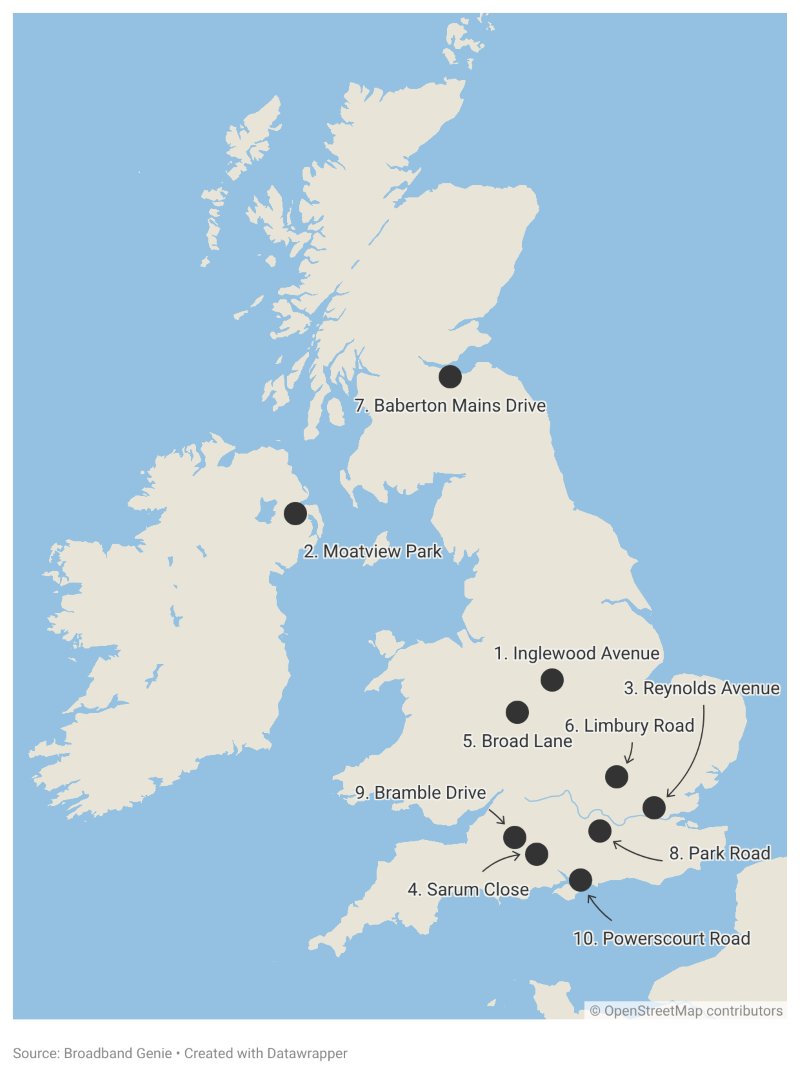
The 10 fastest streets league table
| Rank | Street | Broadband speed |
|---|---|---|
| 1 | Inglewood Avenue, Derby | 1.210Gb |
| 2 |
Moatview Park, Dundonald, Belfast |
1.146Gb |
| 3 |
Reynolds Avenue, Romford |
1.014Gb |
| 4 | Sarum Close, Salisbury | 1.009Gb |
| 5 | Broad Lane, Wolverhampton | 947.1Mb |
| 6 | Limbury Road, Luton | 946.8Mb |
| 7 | Baberton Mains Drive, Edinburgh | 943.2Mb |
| 8 | Park Road, Camberley | 931.3Mb |
| 9 | Bramble Drive, Westbury | 928.4Mb |
| 10 | Powerscourt Road, Portsmouth | 926.3Mb |
Moatview Park, Dundonald on the outskirts of Belfast and Reynolds Avenue, Romford complete the top three. All ten fastest streets in the UK recorded a download speed above 900Mb. This means the majority of occupants will be on cable or full fibre broadband. Currently in the UK, full fibre take-up sits at 42%.
The slowest and fastest streets in Scotland
Turnberry Crescent, Bridge of Don is second in the UK’s slowest streets, so takes the title of Scotland's slowest street. The street on the outskirts of Aberdeen recorded a download speed of 1.06Mb. 890 times slower than Scotland's fastest street, Baberton Mains Drive, Edinburgh, which also features in the UK’s top 10 fastest streets.
Half of Scotland’s top 10 slowest streets (Mayburn Drive, Union Street, Red Craig, Anchor Wynd and Turnberry Crescent) have access to full fibre. Rowan Avenue and Urquhart are unable to get Superfast broadband (30Mb+).
Scotland's slowest streets league table
| Rank | Street | Broadband speed (Mb) |
|---|---|---|
| 1 | Turnberry Cres, Bridge of Don, Aberdeen | 1.06 |
| 2 | Unity Terrace, Perth | 3.02 |
| 3 | Anchor Wynd, Paisley, Renfrewshire | 6.59 |
| 4 | Urquhart, Elgin | 6.82 |
| 5 | Piperhill, Nairn | 7.33 |
| 6 | Rowan Avenue, Huntly | 7.44 |
| 7 | Red Craig, Forres | 7.97 |
| 8 | Union Street, Largs | 9.80 |
| 9 | Mayburn Drive, Loanhead | 10.19 |
| 10 | Fairways Avenue, Muir of Ord | 10.20 |
Scotland's fastest streets league table
| Rank | Street | Broadband speed (Mb) |
|---|---|---|
| 1 | Baberton Mains Drive, Edinburgh | 943.16 |
| 2 | Ballindean Terrace, Dundee | 722.76 |
| 3 | Shore Road, Cove, Helensburgh | 720.46 |
| 4 | Thomson Cres, Port Seton, Prestonpans | 695.95 |
| 5 | Mossilee Road, Galashiels | 623.68 |
| 6 | Pitt Street, Edinburgh | 587.31 |
| 7 | Park Cres, Strathaven | 563.53 |
| 8 | Bloomfield Cres, Arbroath | 527.35 |
| 9 | Erracht Road, Inverness | 509.51 |
| 10 | Mariner Drive, Camelon, Falkirk | 498.96 |
The slowest and fastest streets in Wales
No surprise what the slowest street in Wales is. Heol-Y-Fedw, Cymmer is the UK’s slowest street so also claims the unwanted title of Wales’ slowest street. Chamberlain Row, Dinas Powys takes the crown of Wales’ speediest street, recording a download speed of 893Mb. 1,102 times faster than Heol-Y-Fedw.
Four out of the 10 slowest streets in Wales (Cae Rhos, Gethin Road, Windermere Road and Wesley Street) can sign up to full fibre broadband.
Wales' slowest streets league table
| Rank | Street | Download speed (Mb) |
|---|---|---|
| 1 | Heol-Y-Fedw, Cymmer, Port Talbot | 0.81 |
| 2 |
Wesley Street, Maesteg |
1.45 |
| 3 | Jessop Road, Rogerstone, Newport | 2.62 |
| 4 | Rheolau Terrace, Pontypridd | 2.80 |
| 5 | B4570, Ponthirwaun, Cardigan | 2.83 |
| 6 | Windermere Road, Wrexham | 3.76 |
| 7 | Ellis Drive, Llay, Wrexham | 4.06 |
| 8 | Gethin Road, Tonypandy | 4.14 |
| 9 | Cae Rhos, Holyhead | 6.10 |
| 10 | Blue Anchor Road, Pen-clawdd | 10.58 |
Wales' fastest streets league table
| Rank | Street | Download speed (Mb) |
|---|---|---|
| 1 | Chamberlain Row, Dinas Powys | 892.71 |
| 2 |
Lawson Road, Colwyn Bay |
795.62 |
| 3 | Bryn Glas Close, Holyhead | 608.92 |
| 4 | Brighton Road, Rhyl | 513.00 |
| 5 | Garngoch Terrace, Garden Village, Gorseinon | 400.62 |
| 6 |
Graig View, Aberbeeg, Abertillery |
359.70 |
| 7 | Triplestone Close, Herbrandston, Milford Haven | 343.87 |
| 8 | Caerwent Road, Trevethin, Pontypool | 322.94 |
| 9 | Lon Y Waen, Menai Bridge | 305.38 |
| 10 | Mayflower Drive, Marford, Wrexham | 284.62 |
The slowest and fastest streets in Northern Ireland
The slowest street in Northern Ireland is Orkney Street in Antrim, which recorded a download speed of 2.97Mb. After Orkney Street, it’s quite the jump to Northern Ireland’s second-slowest street; Edenreagh Road in Eglinton which has a download speed of 12.37Mb.
Northern Ireland’s fastest street is Moatview Park, Dundonald which also features in the top three fastest streets of the UK. Residents enjoy download speeds of 1,146Mb. That’s 386 times faster than Northern Ireland's slowest street.
Northern Ireland leads the way for full fibre coverage out of the home nations at 96% and all ten of Northern Ireland's slowest streets have access to full fibre broadband.
Northern Ireland’s slowest streets league table
| Rank | Street | Broadband speed (Mb) |
|---|---|---|
| 1 | Orkney Street, Antrim | 2.97 |
| 2 | Edenreagh Road, Eglinton | 12.37 |
| 3 | Broadlands Gardens, Carrickfergus | 15.22 |
| 4 | Grange Road, Parkgate | 15.47 |
| 5 | Barnetts Crescent, Belfast | 16.15 |
| 6 | Boyhill Road, Enniskillen | 24.48 |
| 7 | Grange Road, Bangor | 27.27 |
| 8 | Staffordstown Road, Randalstown, Antrim | 32.90 |
| 9 | Lisgallon Road, Dungannon | 33.88 |
| 10 | Cotswold Drive, Saintfield | 34.91 |
Northern Ireland’s slowest streets league table
| Rank | Street | Broadband speed |
|---|---|---|
| 1 | Moatview Park, Dundonald, Belfast | 1.15Gb |
| 2 | Ashford Avenue, Bangor | 750.36Mb |
| 3 | Forde Way, Seaforde, Downpatrick | 511.76Mb |
| 4 | Carniny Road, Ballymena | 373.28Mb |
| 5 | Belmont Avenue, Belfast | 347.53Mb |
| 6 | Sheskin Gardens, Londonderry | 342.78Mb |
| 7 | Parkside, Portadown, Craigavon | 334.29Mb |
| 8 | Kensington Court, Dollingstown, Craigavon | 333.57Mb |
| 9 | Glasgow Street, Belfast | 308.28Mb |
| 10 | Ballinderry Road, Upper Ballinderry, Lisburn | 307.39Mb |
The slowest and fastest streets in London
You would think the UK’s capital’s slowest streets would be far above the rest of the UK. However, there were many streets in London with sluggish broadband. London’s slowest street is Rossiter Road, London, has a download speed of 1.74Mb and is placed 5th in the UK’s slowest streets.
However, Rossiter Road occupants shouldn’t need to endure slow broadband, it has access to full fibre broadband. Seven out of the ten streets in London have access to full fibre and eight have access to Ultrafast broadband (100Mb+). Only Uplands Road and North Circular Road don’t have access to Ultrafast broadband.
London's slowest streets league table
| Rank | Street | Download speed (Mb) |
|---|---|---|
| 1 | Rossiter Road, Wandsworth | 1.74 |
| 2 | North Circular Road, Brent | 3.39 |
| 3 | Ravens Way, Lewisham | 3.80 |
| 4 |
Fontenoy Road, Wandsworth |
3.94 |
| 5 | Cromwell Road, Newham | 5.45 |
| 6 | Downage, Barnet | 8.44 |
| 7 | Bentham Walk, Brent | 9.44 |
| 8 | Hartland Way, Merton | 10.13 |
| 9 | Uplands Road, Croydon | 10.36 |
| 10 | Lampard Grove, Hackney | 11.23 |
London's fastest streets league table
| Rank | Street | Broadband speed (Mb) |
|---|---|---|
| 1 | Reynolds Avenue, Romford | 1.01Gb |
| 2 | Tynemouth Street, Hammersmith And Fulham | 912.70 |
| 3 | Berry Close, Barking and Dagenham | 763.25 |
| 4 |
Milton Road, Sutton |
685.62 |
| 5 | Pasture Road, Brent | 611.80 |
| 6 | Launceston Road, Ealing | 557.75 |
| 7 | Langford Place, City of Westminster | 516.62 |
| 8 | St Stephen's Gardens, Kensington and Chelsea | 441.75 |
| 9 | Moorhen Drive, Barnet | 404.31 |
| 10 | Craigen Gardens, Redbridge | 397.81 |
What our experts had to say
“No one should have to put up with sluggish broadband. If you haven’t switched or renewed your broadband deal in over 24 months, you’ll be able to get a speed upgrade and still save money.
“Slow broadband can be caused by many things. Your first port of call should be to run a speed test. If you’ve done all you can to try to improve it, and it’s below what you signed up for, document it and contact your provider. If your provider is signed up to Ofcom’s voluntary codes of practice on better broadband speed and can’t resolve it, you can cancel your deal and at no cost.
“If you’re receiving the broadband speed you were advertised, but you find your connection isn’t fast enough, it’s likely you need an upgrade. Fortunately, the UK’s full fibre landscape is looking stronger and catching up with European rivals. Currently, the UK has 2.4 networks passing each home, and 78% overall full fibre coverage.
“And take-up is catching up, as we’re seeing a competitive market as broadband providers race to encourage more people onto their services and gain market share.
“However, 44,000 premises still can’t get a download speed of at least 10Mb, or what the Government calls a ‘decent’ broadband connection. These homes represent some of the hardest to reach areas. If you have no decent fixed-line connection available at your home, consider 4G or 5G home broadband or alternatives such as satellite broadband.”
- Alex Tofts, broadband expert at Broadband Genie
How fast is your broadband?
To see how fast your broadband is, test your connection using our broadband speed test. For the most accurate results, use Ethernet cables to connect your laptop or computer to your router.
If you’re using your smartphone or don’t have Ethernet cables, follow these steps to get the best reading.
- Close all programs running on your computer, games running on your consoles, or apps on your mobile phone. Don’t forget to check Netflix isn’t running on your TV.
- Switch off or disconnect devices. Disconnect or switch off any other Wi-Fi enabled devices in your home. Don’t forget any Smart appliances you might have, such as freezers or washing machines.
- Stand close to your router and avoid connecting to Wi-Fi boosters if you use them
- Do more than one test. Collect the speed test results at different times of the day, including peak times.
How to improve broadband speed
After you run a speed test, check how your current performance compares to what you signed up for on your broadband contract. If it’s within your contract speed guarantee, and you still want faster broadband, you will have to upgrade to a full fibre broadband contract.
If your broadband is lagging behind what you're paying for, follow these steps to help improve the connection:
- Router position and placement. Place your router as close as you can to the middle of your home, away from walls and other electrical devices. For more details, check out our guide on the best place to put a router.
- Switch frequencies. Modern routers will have a 2.4Ghz and a 5Ghz option. Switch it over to the 5Ghz option for faster speeds. If it’s not done already, you will have to enable this from your router settings, and then it will be found in the Wi-Fi signals available to connect to.
- Router security. It’s possible unwanted users could be using your Wi-Fi. You can check all connected devices in your router settings. Boot off anything you don’t recognise.
- Updates. Update your device, browser, and router software to optimise performance.
If your connection is still sluggish after trying all these steps, contact your provider. There may be an issue they can fix remotely, or they may send an engineer or new router.
If they can’t resolve the issue within one month, you have the right to cancel your contract free of charge.
What is a good broadband speed?
No one wants to be left with slow broadband, but with faster speed comes a higher price, so never pay more for what you need.
Here’s what you should be looking for as a guide, based on the number of people in your household. These speeds should be enough for everyone to comfortably stream high definition video at once:
- 1-person households: 35Mb
- 2-3 people: 35-64Mb
- 4-5 people: 50-100Mb
- 5+ people: 100Mb+
For more tips, read our ultimate guide to broadband speed.
-
Methodology
We took the average broadband download speed at postcode level from 145,926 speed tests from a 12-month period in 2024 and 2025.
To qualify and to be included in the study results, postcodes must meet the following criteria:
- A minimum of three speed tests from three unique IP addresses.
- The test is from a commercial internet service provider
- The test is from a fixed-line internet connection
- At least 8 residential properties required at a postcode
Postcodes were ranked from slowest to fastest.
Speed tests were run through and recorded by the Broadband Genie speed test.
Broadband product availability was checked through the Broadband Genie postcode checker.
5.69Gb film file size was calculated using NXP Studio Video File Size Calculator - https://snxpstudio.co/resources/video-file-size-calculator/
Aladdin (1992) run time: 1 hour 34 minutes (from Disney+).
Download times were calculated using the Broadband Genie speed calculator.